# SRIS2 Public Portal

<span>This document provides the information needed to access Safety Recommendations on the SRIS2 Public Portal.</span>

# Terms and abbreviations

<table id="bkmrk-term%2Fabbreviation-de" style="width: 96.1905%; height: 212.188px;"><tbody><tr style="height: 35px;"><td class="xl65" height="35" style="width: 27.881%; height: 35px;" width="128"><span lang="EN-GB">**Term/Abbreviation**</span></td><td class="xl65" style="width: 72.119%; height: 35px;" width="367"><span lang="EN-GB">**Description**</span></td></tr><tr style="height: 58px;"><td class="xl66" height="58" style="width: 27.881%; height: 58px;" width="128">ECCAIRS</td><td class="xl66" style="width: 72.119%; height: 58px;" width="367">European Co-ordination Centre for Aircraft Incident Reporting Systems</td></tr><tr style="height: 29.7969px;"><td style="width: 27.881%; height: 29.7969px;">E2</td><td style="width: 72.119%; height: 29.7969px;">ECCAIRS 2</td></tr><tr style="height: 29.7969px;"><td style="width: 27.881%; height: 29.7969px;">PDF</td><td style="width: 72.119%; height: 29.7969px;">Portable Document Format</td></tr><tr style="height: 29.7969px;"><td style="width: 27.881%; height: 29.7969px;">SR</td><td style="width: 72.119%; height: 29.7969px;">Safety Recommendation</td></tr><tr style="height: 29.7969px;"><td style="width: 27.881%; height: 29.7969px;">SRIS</td><td style="width: 72.119%;">European Central Repository of Safety Recommendations</td></tr></tbody></table>

For each entity or attribute in the taxonomy, you can find its definition with detailed information, an explanation, and possible values in the [Taxonomy Browser](https://e2.aviationreporting.eu/taxonomy).

# Table of Contents

Table of Contents

Terms and abbreviations

1\. SRIS2 Public portal

# 1. SRIS2 Public portal

<span style="mso-ansi-language: EN-US;">The SRIS2 Public portal collects all the **<span style="mso-bidi-font-family: 'Times New Roman';">published</span>** safety recommendations that Safety Investigation Authorities (SIAs) issue.</span>

<span style="mso-ansi-language: EN-US;">The URL to the SRIS2 Public portal is </span><span lang="EN-GB">[<span lang="EN-US" style="mso-ansi-language: EN-US;">https://sris.aviationreporting.eu/safety-recommendations</span>](https://sris.aviationreporting.eu/safety-recommendations)</span>

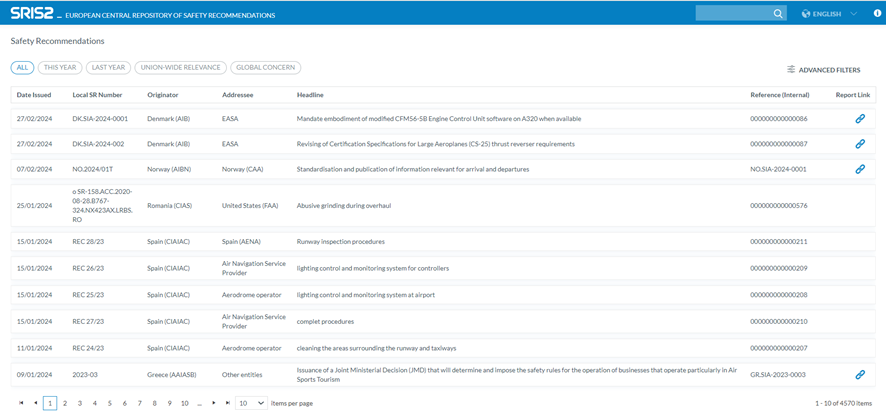
<span style="mso-ansi-language: EN-US;">It provides a list of all the published SRs with the following columns concerning each SR:</span>

[![image.png](https://help.ci-aviationreporting.eu/uploads/images/gallery/2025-11/scaled-1680-/7d2image.png)](https://help.ci-aviationreporting.eu/uploads/images/gallery/2025-11/7d2image.png)

<span style="font-family: Symbol; mso-fareast-font-family: Symbol; mso-bidi-font-family: Symbol; color: #1b3891; mso-themecolor: text1; mso-ansi-language: EN-US;"><span style="mso-list: Ignore;">·<span style="font: 7.0pt 'Times New Roman';"> </span></span></span><span style="mso-ansi-language: EN-US;">Date issued: The date the final recommendation was sent by the originator</span>

<span style="font-family: Symbol; mso-fareast-font-family: Symbol; mso-bidi-font-family: Symbol; color: #1b3891; mso-themecolor: text1; mso-ansi-language: EN-US;"><span style="mso-list: Ignore;">·<span style="font: 7.0pt 'Times New Roman';"> </span></span></span><span style="mso-ansi-language: EN-US;">Local SR Number: The number or reference used to identify the Safety Recommendation at a National (Local) level. This may be different to the automatically generated SRIS number</span>

<span style="font-family: Symbol; mso-fareast-font-family: Symbol; mso-bidi-font-family: Symbol; color: #1b3891; mso-themecolor: text1; mso-ansi-language: EN-US;"><span style="mso-list: Ignore;">·<span style="font: 7.0pt 'Times New Roman';"> </span></span></span><span style="mso-ansi-language: EN-US;">Originator: The identification of the entity/organisation that issued the safety recommendation</span>

<span style="font-family: Symbol; mso-fareast-font-family: Symbol; mso-bidi-font-family: Symbol; color: #1b3891; mso-themecolor: text1; mso-ansi-language: EN-US;"><span style="mso-list: Ignore;">·<span style="font: 7.0pt 'Times New Roman';"> </span></span></span><span style="mso-ansi-language: EN-US;">Addressee: The Name of the organisation to which the safety recommendation was addressed</span>

<span style="font-family: Symbol; mso-fareast-font-family: Symbol; mso-bidi-font-family: Symbol; color: #1b3891; mso-themecolor: text1; mso-ansi-language: EN-US;"><span style="mso-list: Ignore;">·<span style="font: 7.0pt 'Times New Roman';"> </span></span></span><span style="mso-ansi-language: EN-US;">Headline: A short message (about 10 words) to describe the safety issue, area of concern or intent of the Safety Recommendation</span>

<span style="font-family: Symbol; mso-fareast-font-family: Symbol; mso-bidi-font-family: Symbol; color: #1b3891; mso-themecolor: text1; mso-ansi-language: EN-US;"><span style="mso-list: Ignore;">·<span style="font: 7.0pt 'Times New Roman';"> </span></span></span><span style="mso-ansi-language: EN-US;">Reference (Internal): The file number identifying the safety recommendation record</span>

<span style="font-family: Symbol; mso-fareast-font-family: Symbol; mso-bidi-font-family: Symbol; color: #1b3891; mso-themecolor: text1; mso-ansi-language: EN-US;"><span style="mso-list: Ignore;">·<span style="font: 7.0pt 'Times New Roman';"> </span></span></span><span style="mso-ansi-language: EN-US;">Report link (if existing): reference that can be directly followed by clicking the link icon.</span>

<span style="mso-ansi-language: EN-US;">Above the table, the system presents the following tabs to filter the results of the table:</span>

<span style="font-family: Symbol; mso-fareast-font-family: Symbol; mso-bidi-font-family: Symbol; color: #1b3891; mso-themecolor: text1; mso-ansi-language: EN-US;"><span style="mso-list: Ignore;">·<span style="font: 7.0pt 'Times New Roman';"> </span></span></span><span style="mso-ansi-language: EN-US;">All: to display all the published SRs.</span>

<span style="font-family: Symbol; mso-fareast-font-family: Symbol; mso-bidi-font-family: Symbol; color: #1b3891; mso-themecolor: text1; mso-ansi-language: EN-US;"><span style="mso-list: Ignore;">·<span style="font: 7.0pt 'Times New Roman';"> </span></span></span><span style="mso-ansi-language: EN-US;">This year: to display the SRs of the current year.</span>

<span style="font-family: Symbol; mso-fareast-font-family: Symbol; mso-bidi-font-family: Symbol; color: #1b3891; mso-themecolor: text1; mso-ansi-language: EN-US;"><span style="mso-list: Ignore;">·<span style="font: 7.0pt 'Times New Roman';"> </span></span></span><span style="mso-ansi-language: EN-US;">Last year: to display the previous year's SRs.</span>

<span style="font-family: Symbol; mso-fareast-font-family: Symbol; mso-bidi-font-family: Symbol; color: #1b3891; mso-themecolor: text1; mso-ansi-language: EN-US;"><span style="mso-list: Ignore;">·<span style="font: 7.0pt 'Times New Roman';"> </span></span></span><span style="mso-ansi-language: EN-US;">Union-Wide Relevance.</span>

<span style="font-family: Symbol; mso-fareast-font-family: Symbol; mso-bidi-font-family: Symbol; color: #1b3891; mso-themecolor: text1; mso-ansi-language: EN-US;"><span style="mso-list: Ignore;">·<span style="font: 7.0pt 'Times New Roman';"> </span></span></span><span style="mso-ansi-language: EN-US;">Global Concern.</span>

Opposite the tabs (above the table), the system displays the ‘Advanced Filters’ button that opens the corresponding Advanced Filters screen:

<span style="mso-ansi-language: EN-US;">They include the following filters:</span>

<span style="font-family: Symbol; mso-fareast-font-family: Symbol; mso-bidi-font-family: Symbol; color: #1b3891; mso-themecolor: text1; mso-ansi-language: EN-US;"><span style="mso-list: Ignore;">·<span style="font: 7.0pt 'Times New Roman';"> </span></span></span><span style="mso-ansi-language: EN-US;">Date Issued Between (Date to be filled) and (Date to be filled)</span>

<span style="font-family: Symbol; mso-fareast-font-family: Symbol; mso-bidi-font-family: Symbol; color: #1b3891; mso-themecolor: text1; mso-ansi-language: EN-US;"><span style="mso-list: Ignore;">·<span style="font: 7.0pt 'Times New Roman';"> </span></span></span><span style="mso-ansi-language: EN-US;">Originator equal to: a drop-down menu with all the available Originators</span>

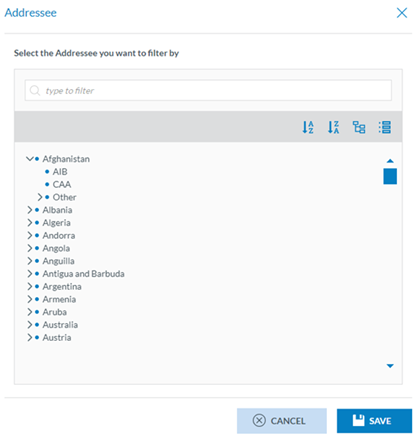
<span style="font-family: Symbol; mso-fareast-font-family: Symbol; mso-bidi-font-family: Symbol; color: #1b3891; mso-themecolor: text1; mso-ansi-language: EN-US;"><span style="mso-list: Ignore;">·<span style="font: 7.0pt 'Times New Roman';"> </span></span></span><span style="mso-ansi-language: EN-US;">Addressee equal to: Users have to click on the ‘Add Addressee’ button that dis-plays a window with all the available addressees per country to be selected:</span>

[![image.png](https://help.ci-aviationreporting.eu/uploads/images/gallery/2025-11/scaled-1680-/xSkimage.png)](https://help.ci-aviationreporting.eu/uploads/images/gallery/2025-11/xSkimage.png)

<span style="font-family: Symbol; mso-fareast-font-family: Symbol; mso-bidi-font-family: Symbol; color: #1b3891; mso-themecolor: text1; mso-ansi-language: EN-US;"><span style="mso-list: Ignore;">·<span style="font: 7.0pt 'Times New Roman';"> </span></span></span><span style="mso-ansi-language: EN-US;">Original Text \[Word\] Contain: Free text field</span>

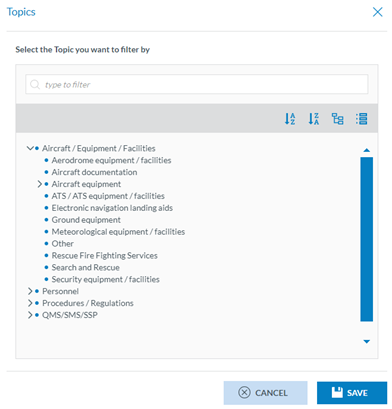
<span style="font-family: Symbol; mso-fareast-font-family: Symbol; mso-bidi-font-family: Symbol; color: #1b3891; mso-themecolor: text1; mso-ansi-language: EN-US;"><span style="mso-list: Ignore;">·<span style="font: 7.0pt 'Times New Roman';"> </span></span></span><span style="mso-ansi-language: EN-US;">SR Topics equal to: Users must click on the ‘Add New Topic’, and the system will display a window to select the topics. Only one topic can be selected at a time:</span>

[![image.png](https://help.ci-aviationreporting.eu/uploads/images/gallery/2025-11/scaled-1680-/souimage.png)](https://help.ci-aviationreporting.eu/uploads/images/gallery/2025-11/souimage.png)

<span style="font-family: Symbol; mso-fareast-font-family: Symbol; mso-bidi-font-family: Symbol; color: #1b3891; mso-themecolor: text1; mso-ansi-language: EN-US;"><span style="mso-list: Ignore;">·<span style="font: 7.0pt 'Times New Roman';"> </span></span></span><span style="mso-ansi-language: EN-US;">Headline Contain: free text field.</span>

<span style="font-family: Symbol; mso-fareast-font-family: Symbol; mso-bidi-font-family: Symbol; color: #1b3891; mso-themecolor: text1; mso-ansi-language: EN-US;"><span style="mso-list: Ignore;">·<span style="font: 7.0pt 'Times New Roman';"> </span></span></span><span style="mso-ansi-language: EN-US;">Addressee text Contain: free text field.</span>

<span style="font-family: Symbol; mso-fareast-font-family: Symbol; mso-bidi-font-family: Symbol; color: #1b3891; mso-themecolor: text1; mso-ansi-language: EN-US;"><span style="mso-list: Ignore;">·<span style="font: 7.0pt 'Times New Roman';"> </span></span></span><span style="mso-ansi-language: EN-US;">English Text \[Word\] Contain: free text field.</span>

<span style="mso-ansi-language: EN-US;">Users can insert the necessary parameters in the filters and click on the ‘Search’ button, and the system will restrict the table results based on that information.</span>

<span style="mso-ansi-language: EN-US;">The ‘Clear’ button removes the filters.</span>

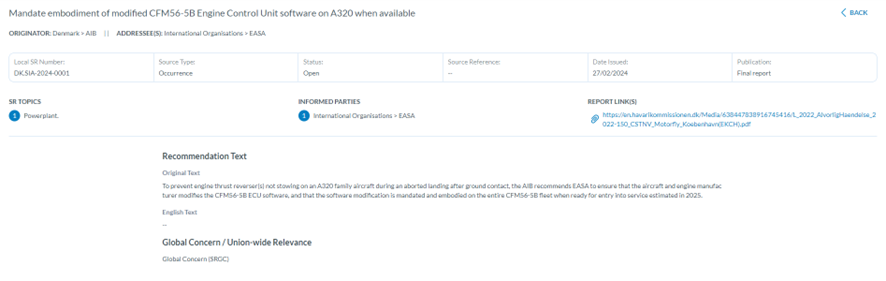
**<span lang="EN-GB" style="mso-bidi-font-family: 'Times New Roman';">Access to SR detailed information</span>**<span style="mso-ansi-language: EN-US;">: Users can click on each SR of the table, and the detail of each SR will be displayed:</span>

[![image.png](https://help.ci-aviationreporting.eu/uploads/images/gallery/2025-11/scaled-1680-/BYLimage.png)](https://help.ci-aviationreporting.eu/uploads/images/gallery/2025-11/BYLimage.png)

**<span lang="EN-GB" style="mso-bidi-font-family: 'Times New Roman';">Search field</span>**<span style="mso-ansi-language: EN-US;">: Opposite to the SRIS2 Header, there is a Search field.</span>

[![image.png](https://help.ci-aviationreporting.eu/uploads/images/gallery/2025-11/scaled-1680-/mepimage.png)](https://help.ci-aviationreporting.eu/uploads/images/gallery/2025-11/mepimage.png)

<span style="mso-ansi-language: EN-US;">It helps users find the specific SRs in the list of results.</span>

<span style="mso-ansi-language: EN-US;">The Language drop-down menu next to the Search field is currently unavailable.</span>

<span style="mso-ansi-language: EN-US;">The Information icon on top of the page on the right side opens a PDF with SRIS2 information on the legislation applicable to the website.</span>